Instant Bitcoin key delivery

Paid? Paste your transaction ID.

Submit your email and payment ID. Eligible payments get a key emailed within about a minute, before Bitcoin confirms.

  1. 1Choose your plan
  2. 2Send Bitcoin
  3. 3Submit your ID
Latest download · Latest 2KTool

2KTool is here — download the new EXE

Get the updated My Player and Live Stats workspaces, a cleaner menu, and signed application and update checks.

Already using an older version? Use the Updates page in 2KTool, or close the old app and download the new 2KTool.exe below. Sign in with your existing trainer account. Install the latest release; each game keeps its existing license.

Download new 2KTool.exe
New: NBA 2K16 trainer · 2KTool

Build the player
you actually want.

Live trainers for NBA 2K17 and NBA 2K16 on PC. Set badges, attributes and hot zones from one clean window. No Cheat Engine, no tables to load.

  • ✓Free tier for NBA 2K17
  • ✓Keys emailed automatically
  • ✓7-day refund

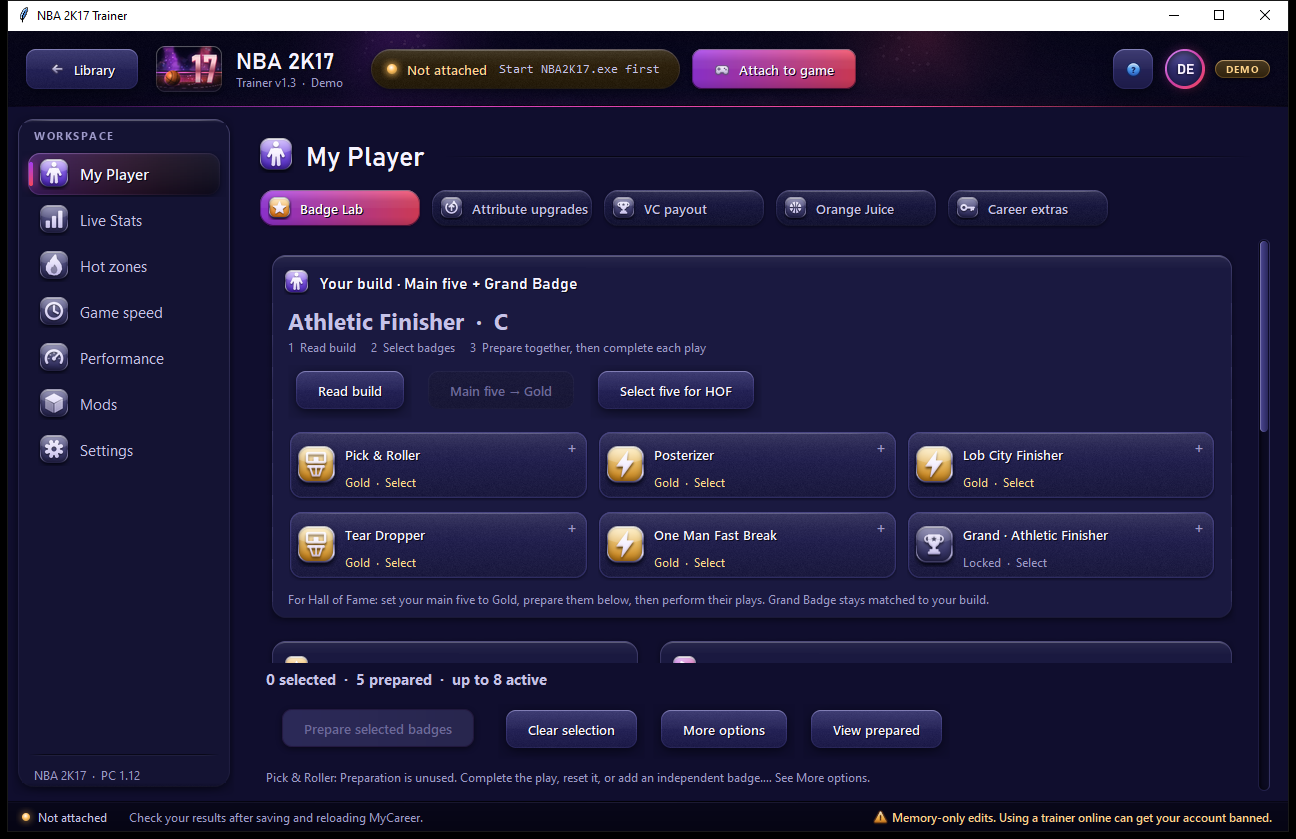
The current My Player workspace · Explore the new tool →

2games supported
5main badges for your build
Autokey delivery
$0to start (2K17 Free)

WATCH & FOLLOW ALONG

Your My Player walkthrough

Learn where to click, what to do in-game, and how to check your results.

11 min · 9 chapters

English narration and on-screen captions. Demo player data shown. Covers Badge Lab, attribute upgrades, VC payout, Orange Juice, and career extras.

Made for 2KTool 1.0.3 · AI-narrated customer guide. Follow the tool’s status messages and save/reload checks. Need help?

Pick your game

Two trainers. One account.

Use the same trainer account for both games. Each game has its own license, or get both in the bundle.

NBA 2K17: the new My Player Badge Lab
NBA 2K17Free tierLatest 2KTool

2KTool · NBA 2K17

Included in the current 2KTool app. Open NBA 2K17 from your library for My Player, Live Stats and Hot zones. Supports Steam build 1.12.

  • Build-aware Badge Lab with multiple badge preparations
  • My Player upgrades, VC payout, Orange Juice and career extras
  • Live Stats, hot zones, hotkeys, mods and performance tools
What's in Free vs Pro?
NBA 2K17: Free and Pro
FeatureFreePro
Live Stats*Yes*Yes
Performance & SettingsYesYes
My Player: Badge Lab, upgrades & VC payoutLockedYes
Hot zones & Game speedLockedYes
ModsLockedYes

*Individual Pro-only controls stay locked on Free. Game speed is Pro-only. 1 PC and 1 active session per account.
New
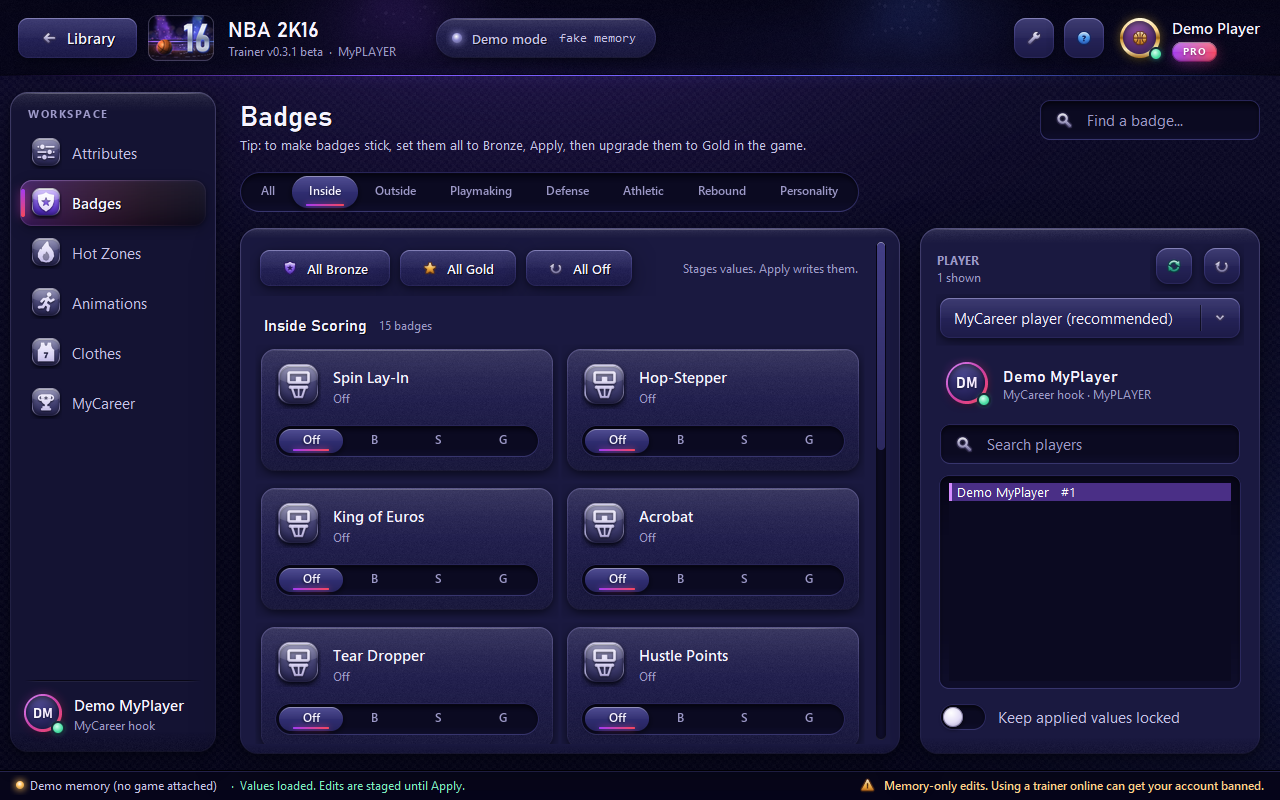
NBA 2K16: Badges in 2KTool 1.0.2
NBA 2K16Pro onlyLatest 2KTool

2KTool · NBA 2K16 Trainer

PC, Patch 5. Comes in the new 2KTool launcher, which also opens the NBA 2K17 trainer with the same sign-in.

  • Attributes, badges, hot zones, animations, clothes
  • MyCareer page: max upgrades, upgrade cost, boost games
  • Launcher with automatic updates and Personalize

How to make badges stick → Load your MyCareer save after the trainer is open so it can find your player. Finding the player is confirmed on Patch 5; the newer pages are still being checked, so tell us if something doesn't apply.

Current app

Inside 2KTool

Explore the new My Player workspace, Live Stats, Hot zones and library.

NBA 2K17 — My Player / Badge Lab
NBA 2K17 — My Player / Badge Lab NBA 2K17 — Live Stats / Match controls NBA 2K17 — My Player / VC payout NBA 2K17 — Hot zones and save guide 2KTool — Library NBA 2K16 — Badges NBA 2K16 — Hot zones 2KTool — Personalize

2KTool 1.0.2 screenshots. Demo data is shown; no customer accounts are pictured.

Get started

Up and running in 3 steps

Start free on NBA 2K17. Buy a key whenever you're ready.

  1. 1

    Download

    Get 2KTool, one app for both NBA 2K16 and NBA 2K17, and open it. Windows asks for admin rights and your antivirus may warn about it (why).

  2. 2

    Create your account

    In the app, choose Create account: pick a username and password. Leave the key empty for NBA 2K17 Free. One account works for both games.

  3. 3

    Buy & redeem a key

    Pick a plan, pay, and your key is emailed to you. In the app, use Redeem key and sign in again.

Needs Windows 10 or 11 and NBA 2K17 (Steam, build 1.12) or NBA 2K16 (PC, Patch 5).

Pricing

Pick your game, or get both

Each trainer has its own license. The bundle unlocks both on one account.

NBA 2K17
NBA 2K17 Trainer
$3060/monthonce
30 days · or $60 lifetimelifetime · or $30/month
  • Every NBA 2K17 tool
  • Free tier included (no key)
  • Game data updates included
Buy NBA 2K17
NBA 2K16
2KTool · NBA 2K16
$1535/monthonce
30 days · or $35 lifetimelifetime · or $15/month
  • Every NBA 2K16 page
  • 2KTool launcher + updates
  • Pro only
Buy NBA 2K16
Both games
NBA 2K17NBA 2K16
Bundle: both trainers
$40100/monthonce
save $5 a month · or $100 lifetimeboth games, one key · or $40/month
  • Both games, one account
  • One key unlocks both
  • Everything above included
Get the bundle
Park Rep Tool
Coming soon

Temporarily unavailable. Check back for updates.

Park + 2K17 package
Coming soon

Temporarily unavailable. Check back for updates.

Already a customer? Legacy trainer customers may have prior NBA 2K16 grants. New purchases unlock only the products listed on the chosen plan.

7-day refund · refund policy · 1 PC per account

You can get banned — read this before you buy

The trainers change your game's memory, and servers and their staff can log what happens to a player. Any account you use them on is at risk of being flagged or banned.

Extra or impossible edits are what stand out. More badges than your build should have, ratings no real player on that build could have, or lots of extra changes make your player stand out in a server's logs. Keep your player to what that build or archetype could actually have (Badge Lab reads your build and identifies its main badges).

Nothing here makes it safe or undetectable, and we can't promise you won't be banned. Only use it where it's allowed, at your own risk.

Checkout

Your payment ID. Your key.

Already paid? Choose the trainer and plan you paid for, then submit your transaction ID and email in step 3. Buying now? Follow all three steps.

1Choose your key

Send exactly$30in Bitcoin (BTC)

Use the going BTC rate. The amount that arrives must cover the price and match the trainer you choose, or we check it by hand.

  • ✓Key emailed automatically
  • ✓Track it in My orders
  • ✓7-day refund

2Send the Bitcoin

Bitcoin QR code - scan to pay

Scan the QR with any wallet (MoonPay, Cash App, Coinbase…) or copy the address:

bc1qt9e445w3mae84k8x5v2293fpmv3g7k96jtkyrx

Bitcoin (BTC) only, on the regular Bitcoin network. Payments can't be reversed, so check the address.

No Bitcoin yet? Buy it with a card in MoonPay, then send it here.

3Submit your ID. Get your key.

Copy the transaction ID (also called "txid" or "hash", 64 letters and numbers) from the payment's details in your wallet, then submit it with your email.

Eligible payments are usually emailed within about a minute. Check your spam folder too. Some payments need confirmation or a manual check. Need help? Open a ticket in Discord support.

How instant delivery worksAvailable on every paid plan, including both bundles

We check the transaction on the Bitcoin network, the amount received, your selected trainer and plan, and the network fee. A transaction claimed by different buyers or with conflicting plan choices needs review. Low-fee payments wait for confirmation.

An early key may be cancelled if the payment disappears or has not confirmed within 24 hours of key issue. Only the remaining access from that key is removed; other purchased time is kept. If it confirms within seven days of key issue, a replacement key is emailed automatically.

A transaction ID is the 64-character ID from your wallet’s payment details. It is not your wallet address or an exchange order number. Never submit a password, seed phrase or private key.

Other ways to pay

Pay with MoonPayBuy Bitcoin with a card, Apple Pay or Google Pay, then send it here · recommended
  1. Get MoonPay. Download the MoonPay app or go to moonpay.com, create an account and verify your identity if it asks.
  2. Buy Bitcoin (BTC). Tap Buy, choose Bitcoin and pay with your debit/credit card, Apple Pay or Google Pay. Buy enough to cover the trainer and plan selected in checkout plus the network fee.
  3. Send it to our address. Open your Bitcoin, tap Send, choose the regular Bitcoin network and paste our address (or scan the QR in step 2 above): bc1qt9e445w3mae84k8x5v2293fpmv3g7k96jtkyrx Enter the price and check the fee: the amount that arrives must cover the full price. Bitcoin sends can't be undone.
  4. Copy the Transaction ID (txid / hash) from the send's details, then submit it with your email in step 3 of the checkout above. Your key is emailed automatically.

Already on MoonPay? You can also send to our MoonPay username @Caliberdev. A transfer between MoonPay accounts may not show up on the Bitcoin network, so it can't be matched automatically — make a ticket in our Discord with your email, the trainer and plan, and a screenshot of the payment, and we'll send your key by hand.

MoonPay may hold newly bought Bitcoin or limit sends while your account is new or being verified — those are MoonPay's rules.

Paying from Cash AppBuy Bitcoin in Cash App and send it here · about 5 minutes
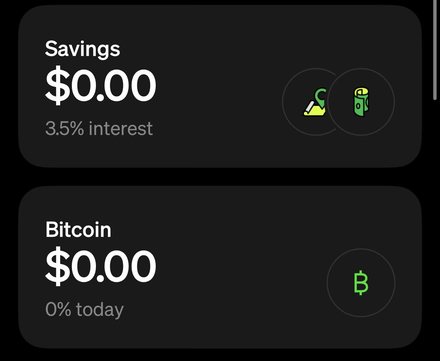
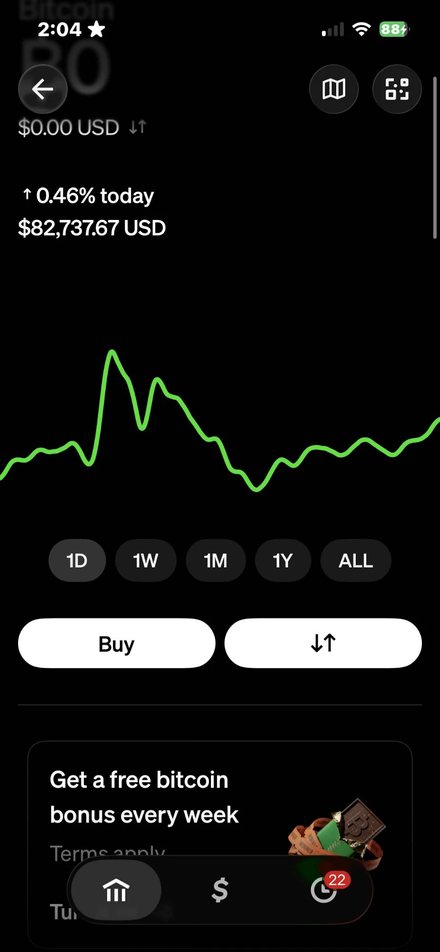
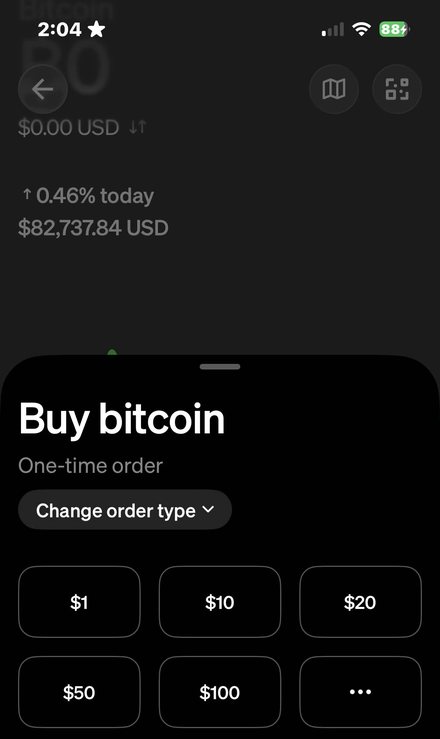
  1. Buy a little Bitcoin. On the Cash App home screen tap the Bitcoin card, then Buy. Buy enough BTC to cover the price selected in checkout plus your wallet's network fee.

    Important: the amount you buy can include a fee cushion. When you send, make sure the amount arriving matches the selected trainer and plan in checkout.

    Cash App home screen with the Bitcoin card
    Tap the Bitcoin card
    Cash App Bitcoin screen with the Buy button
    Tap Buy
    Cash App Buy bitcoin screen with amount buttons
    Pick an amount
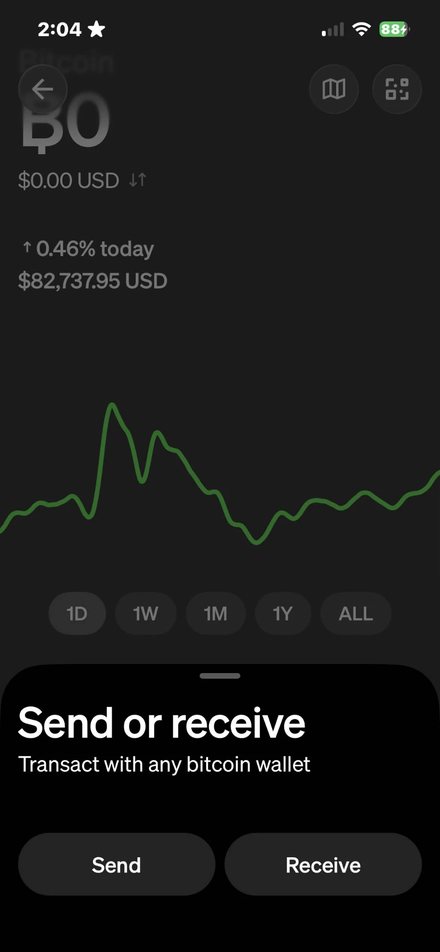
  2. Send it. On the Bitcoin screen tap the ⇅ button next to Buy, then Send. Scan the QR code above or paste the address. bc1qt9e445w3mae84k8x5v2293fpmv3g7k96jtkyrx
    Cash App Send or receive options
    Tap Send (not Receive)
  3. Type the exact price and check the network fee: the amount that arrives must cover the full price. Bitcoin sends can't be undone.
  4. Copy the Transaction ID from Activity → the Bitcoin withdrawal, then fill in step 3 of the checkout above.

If Cash App won't let you send yet (limits, verification or a hold on newly bought Bitcoin), try again later — those are Cash App's rules.

Put your email in the Cash App note (the "For" line) when you send it — that's where we send the key.

  1. Send the exact amount to $caliberbckup on Cash App: $30 for a month or $60 for lifetime.
  2. Put your email in the note. The key is emailed there automatically.

Cash App monthly plans don't renew by themselves.

No Cash App? Use a debit cardBuy Bitcoin in Coinbase, Strike, Venmo or PayPal, then send it here
  1. Install the app, sign up and verify your identity if it asks.
  2. Buy enough Bitcoin (BTC) for the trainer and plan selected in checkout, plus the wallet network fee.
  3. Find Send / Withdraw, choose Bitcoin on the regular network, paste the address or scan the QR, enter the exact price and check the fee.
  4. Copy the transaction ID and submit it in step 3 of the checkout above.
Coinbase

Buy & Sell → Bitcoin with your debit card, then Send → Bitcoin → paste the address. New accounts or freshly bought coins can be held for a while.

Strike

Buy Bitcoin, then send on-chain (the regular Bitcoin network) to the address. Only use Lightning when scanning a Lightning invoice.

Venmo

In the Crypto tab buy Bitcoin, then look for transfer to an outside wallet. Not every account can send crypto out.

PayPal crypto

Buy Bitcoin with your debit card, then Transfer / Send it to an external wallet. Depends on your region and account.

Want to use PayPal?Message us and we'll set you up by hand

Open a private ticket in Discord support. Say which trainer you want (NBA 2K17, NBA 2K16 or both).

Help center

Questions & fixes

Straight answers, including the uncomfortable ones.

Will I get banned?

Yes, you can. Changing game memory carries risk, and anti-cheat or server checks may detect tools like this. Edits no real player on your build could have make your player stand out in logs, so keep your player to what that build could actually have. We cannot promise it is safe or undetectable. Use it only where it's allowed, at your own risk.

Which game versions work?

NBA 2K17 for PC on Steam, build 1.12, and NBA 2K16 for PC, Patch 5 (2KTool). Other versions are not supported.

Do I need a license for each game?

Yes. NBA 2K17 is $30 a month or $60 lifetime. NBA 2K16 is $15 a month or $35 lifetime. The bundle is $40 a month or $100 lifetime and unlocks both. Redeem every key on the same trainer account.

I bought before NBA 2K16 came out. What do I get?

Lifetime buyers have NBA 2K16 lifetime included: download 2KTool and sign in. Monthly buyers got a free NBA 2K16 month as a separate key by email; its 30 days start when you redeem it.

My antivirus flags the file. Why?

Programs that edit another program's memory are often flagged as suspicious, and a warning should not be treated as proof that a file is harmless. If you do not trust the download, do not run it.

Website account or trainer account?

They are separate. The website account only shows your orders. In the trainer, choose Create account first, then redeem your key there.

Can I use it on two PCs?

One account is tied to one PC. If you get a new PC, contact support and it will be reset.

What happens when a monthly plan ends?

Your session ends at its next check. Sign in again to continue with Free (NBA 2K17), or redeem a new key. Nothing is deleted.

Does everything work perfectly?

No. Features marked experimental are still being checked. If something does not work for you, tell us, or ask for a refund inside the refund window.

Is this affiliated with 2K or the NBA?

No. This is an independent tool. NBA 2K, 2K Games, Take-Two and the NBA are trademarks of their owners and are not connected to this product.

Update to the current 2KToolOne download for NBA 2K17 and NBA 2K16
  1. Close the old trainer or 2KTool window.
  2. Download the current 2KTool.exe below and open it.
  3. Sign in with your existing trainer account, then choose your game in the library. Your license stays on your account.

Already in 2KTool? You can also use its Updates page. If a connection error remains, open a ticket in Discord support and include the error code. Never share your password or full key.

"Network error" checklistClock, connection, Windows updates, error codes
  1. Open 2k17trainer.com on the same PC. If it doesn't load, check your connection.
  2. Windows clock: Settings > Time & language > Date & time > automatic time + Sync now.
  3. Try another network once (phone hotspot) or turn off a personal VPN.
  4. Update Windows and restart. Don't turn off your firewall or antivirus; send us the warning instead.

NET-TIMEOUT connection timed out · NET-DNS address not found · NET-CERT / NET-TLS secure-connection checks failed (clock, updates) · anything else: send the code to support.

GuidesNBA 2K16 badge saves · NBA 2K17 attribute upgrades

Watch the full NBA 2K17 My Player tutorial

Make your badges stick (NBA 2K16 · 2KTool)

Badges set straight to Gold can reset. Badges you upgrade in the game don't. So let 2KTool put them on Bronze, then upgrade them to Gold yourself:

  1. Open 2KTool, start NBA 2K16 and load your MyCareer save so the trainer finds your player.
  2. Go to Badges and press All Bronze (on older versions, set each badge to B), then press Apply.
  3. In the game, open your MyPLAYER upgrade screen and upgrade the badges you want from Bronze to Gold.
  4. Save the game. Check your player card — the badges should still be there after a reload.

Based on the creator's own testing. Keep your badges to what your build could actually have (see the ban warning).

Attribute upgrades in 2KTool (NBA 2K17)

  1. Open NBA 2K17 from your 2KTool library and load MyCareer.
  2. Go to My Player → Attribute upgrades.
  3. Read the current progress, then follow the instructions shown in the tool to prepare and complete the next upgrade.
  4. Save and reload MyCareer to check the result.

The current tool shows the next step for each feature. Results depend on the loaded career; a particular overall rating is not guaranteed.

Still stuck?Open a support ticket on Discord→
My orders

Track your order

Sign in with the email you paid with to see your order number, status and key. This website account is separate from your trainer account.

Updates

What's new

2KTool updates itself and includes both the NBA 2K16 and NBA 2K17 trainers.

  1. 2KTool 1.0.9
    • Hustle Rebounder Hall of Fame preparation now supports Gold on a matching Glass Cleaner. Use Prepare or Auto-fill, then get an offensive and a defensive rebound in MyCareer.
    • Includes the missing-module launch fix and login-screen updater. Existing protections retained.
    • HOF award and save persistence still need in-game confirmation. Finish, save and reload to check.
  2. 2KTool 1.0.6
    • Grand Badge preparation, refreshed badge removal, Main five to Bronze, and Read all badges.
    • Loaded-MyPlayer badge controls and queued MyCareer preparations. Complete the listed in-game plays and save normally.
    • Existing protections retained. MyPark rep-credit testing remains separate.
  3. 2KTool 1.0.5
    • MyPark Tool: coming soon. Purchases are temporarily unavailable.
    • NBA 2K17: quick Bronze badge selection, mapped accolade-progress reset, and visible Auto-fill controls.
  4. 2KTool 1.0.4
    • MyPlayer / Create-a-Player selection stays at the top on every NBA 2K17 page.
    • New My Player tutorial with chapters and downloadable guides.
  5. 2KTool 1.0.3
    • My Player: build-aware Badge Lab, attribute upgrades, VC payout, Orange Juice and career extras in one place.
    • Live Stats: organized match controls and statistics. Quarter, clock and score controls are also available in VC payout.
    • Cleaner navigation: Advanced Tools removed, with a guided Hot zones save check.
    • Application protection: signed EXE and update checks, restricted DLL search and encrypted remembered sessions. These do not guarantee protection from every runtime modification.
  6. 2KTool 1.0
    • NBA 2K16 trainer: attributes, badges, hot zones, animations, clothes and a MyCareer page, inside the new 2KTool launcher (download).
    • One launcher: one sign-in for NBA 2K16 and NBA 2K17, automatic updates, diagnostics and "Report a problem".
    • Personalize: your own profile picture, accent colours, backgrounds and game covers.
    • New pricing: per-game licenses and a bundle were introduced. See the current pricing above for today's rates. Existing lifetime buyers got NBA 2K16 lifetime; monthly buyers got a free NBA 2K16 month.
  7. v1.3
    • Doin' Work fix: removed the custom Doin' Work fill amount and the typed-value editors in Advanced. Typing large amounts broke the in-game Doin' Work bar; the fill now uses a fixed, safe amount.
    • Already broken? Use Repair bar on the Experimental page, then back out of the upgrade screen and re-enter it.
    • Connection fix built in: the trainer and updater carry their own certificate store (fixes "certificate has expired") and show NET- error codes.
Older updates
  1. v1.2
    • Instant Cash App delivery (now paused: pay from Cash App with Bitcoin).
    • Badge corrections: verified five-badge Hall of Fame presets; shared Grand Badges kept for matching builds, unrelated ones cleared.
    • Remember me and an auto-updater with progress, download checks, backup and relaunch.
  2. v1.1
    • Grand badge fix when switching builds, and the first updater.
  3. v1.0
    • Initial release: Point Forward badge fix, Hall of Fame presets for 11 archetypes, hot zones, keybindings, new UI, secure login.
Support

Get support on Discord

Payment problem, a bug, or a new PC? Join our Discord and open a support ticket.

Share your order number (from My orders) or purchase email only in a private support ticket. Never share your password or full license key.